Skip to content

New Connect Claude or ChatGPT to your meetings with the MCP server. Learn more →

AI meeting minutes, hosted in Switzerland

In a meeting, everything gets said.
With notograph.ai, nothing gets lost.

In person, on video calls or for your voice notes,
notograph.ai records, transcribes and writes the summary.

0
meetings used to train an AI.
100%
of recordings stored and processed on our own servers in Switzerland.
90+
languages detected automatically.
120 min
free every month, no credit card.

How it works

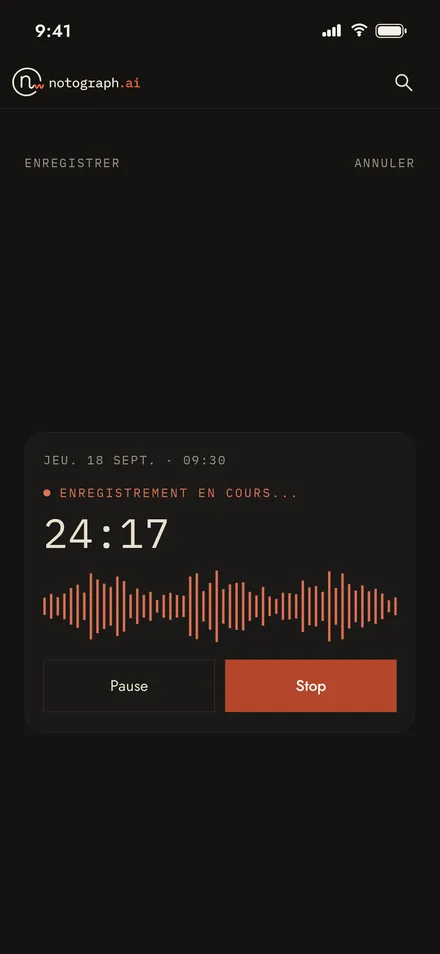
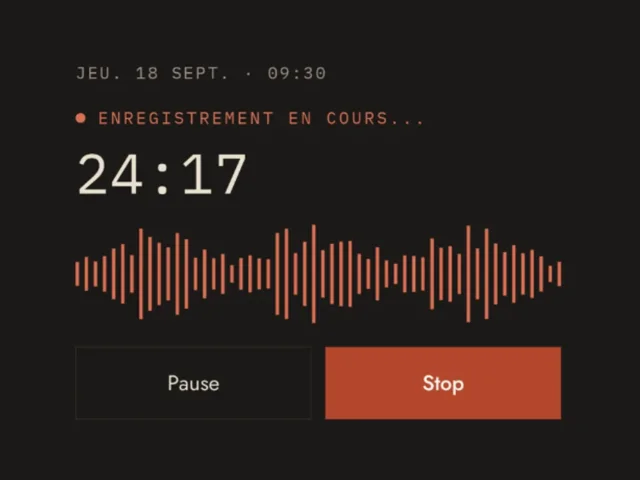
Recording in progress in the notograph.ai app
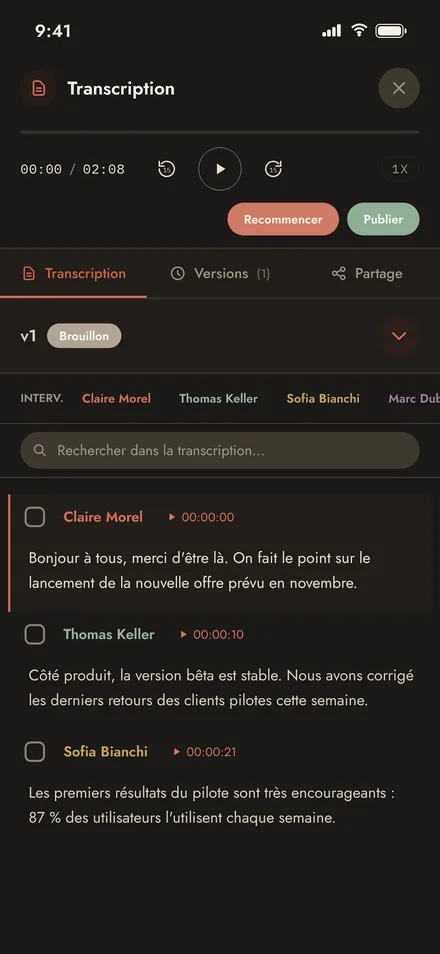
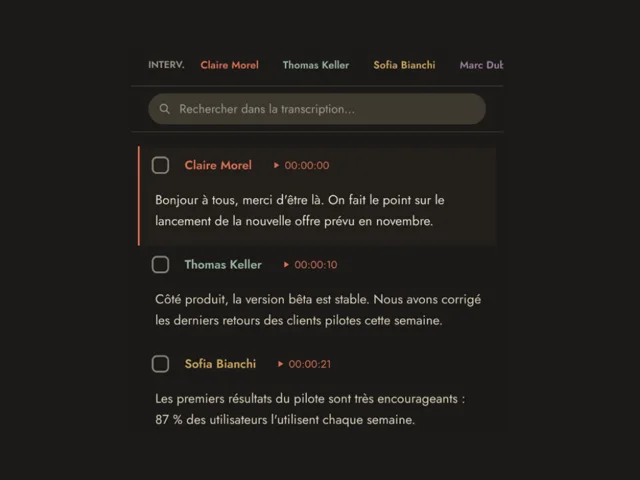
Transcript with named speakers and a timestamp on every intervention
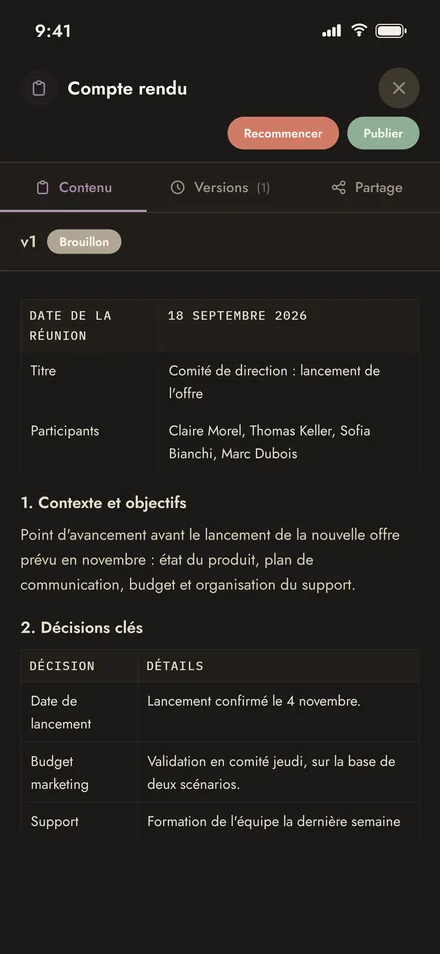
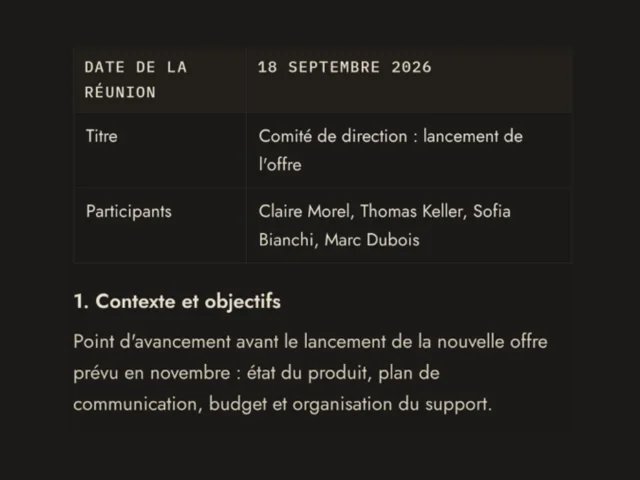
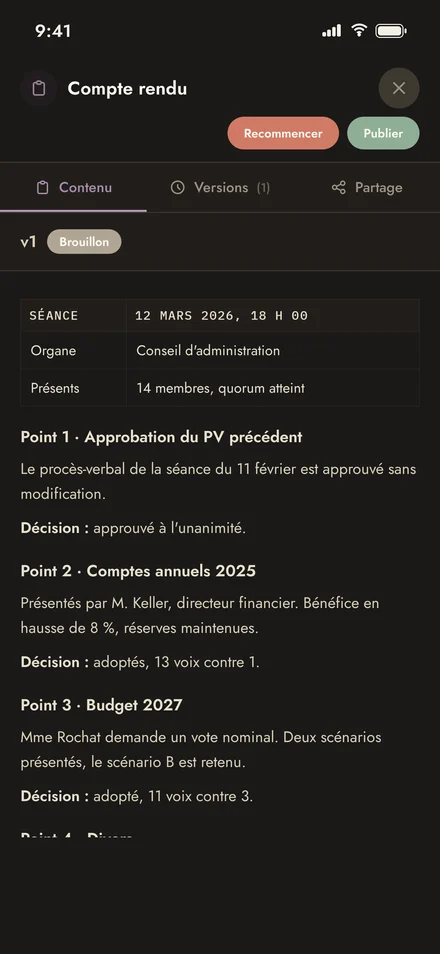
Minutes generated by notograph.ai, with context, decisions and actions
  1. Record or import

    From the iPhone or Android app, or in your browser. You can also import an audio or video file.

  2. Transcription

    The AI transcribes the meeting with timestamps and recognises each speaker, named if participants introduce themselves.

  3. Summary

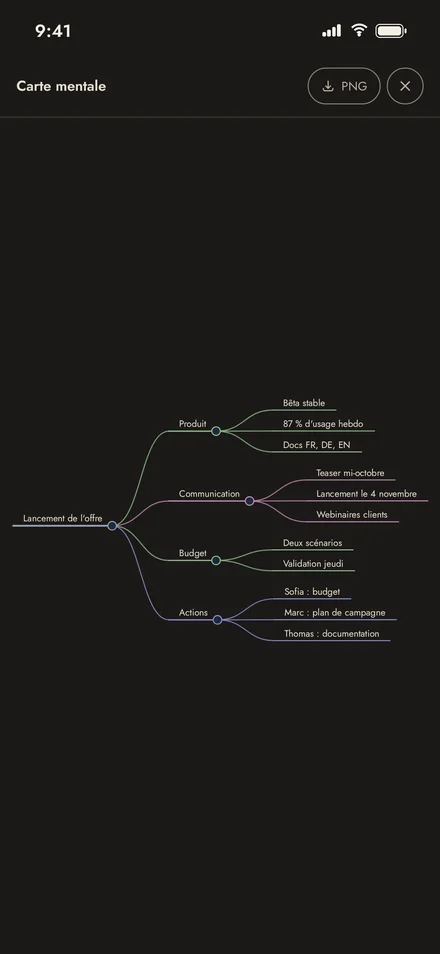
    notograph.ai then writes the summary: overview, decisions, action items and mind map.

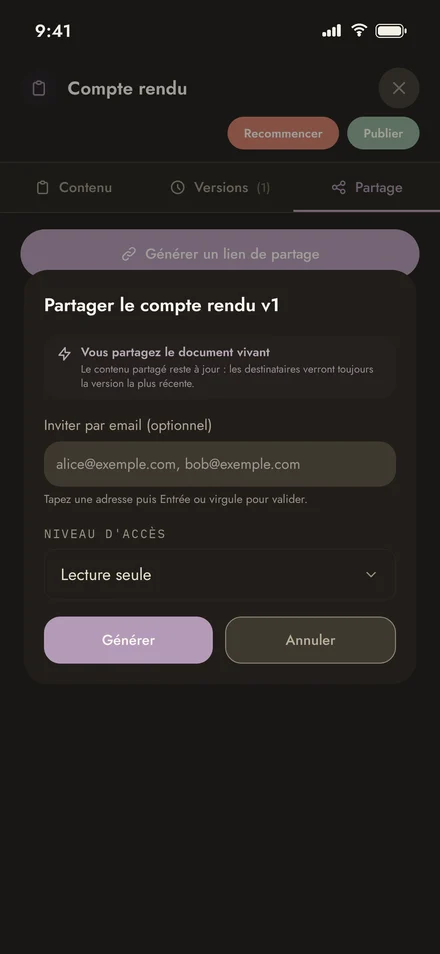
  4. Share

    Two ways to share:

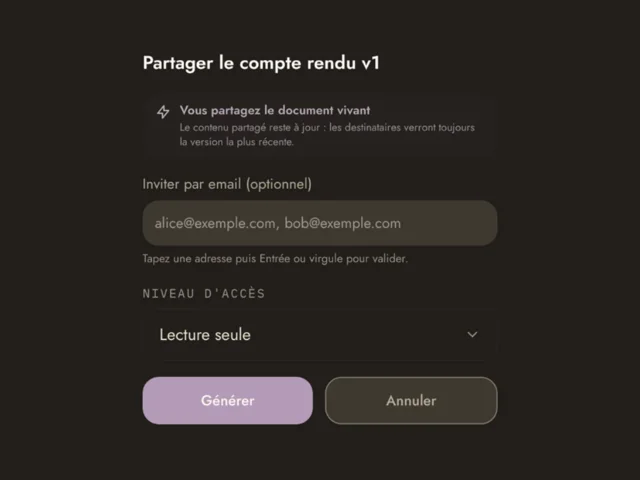
    • A secure link, with the access level you choose: read, listen or download.
    • A PDF or Word document, in your company's colours.

notograph.ai

Your attention belongs to the meeting.
Not to your notes.

Start for free
  • 120 free minutes every month
  • No credit card
  • No commitment

For every meeting,
the right document.

Word for word

Everything that was said, as it was said. Each voice is recognised and named, each contribution timestamped.

The official record

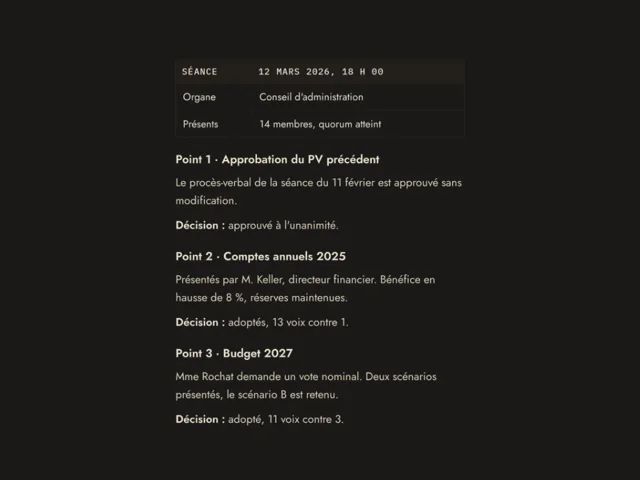
The authoritative document. It follows your agenda item by item and records every decision and every vote. Ready for approval.

The essentials

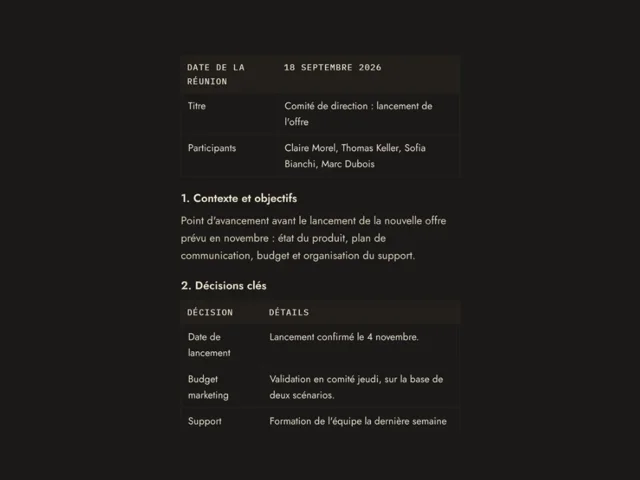
Summary. The context and the decisions, written to be read quickly.

Action items. Who does what, and by when. Nothing is left hanging.

The big picture

Summary by topic. The meeting broken down by subject: budget, planning, recruitment... Each summed up in a few lines.

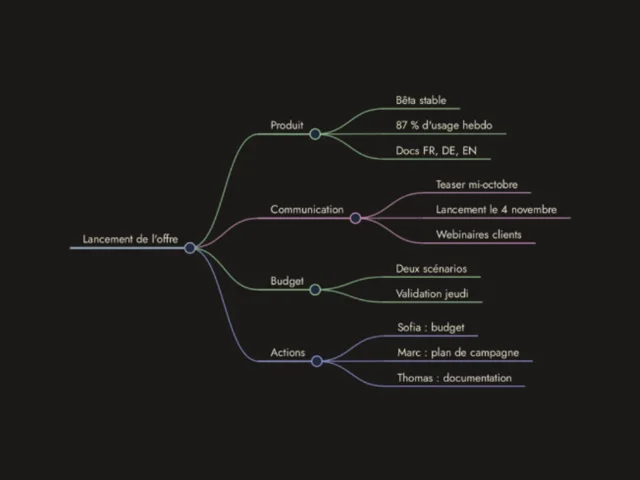
Mind map. Every point discussed, linked together. See in thirty seconds what the meeting was about.

Transcript with named speakers and a timestamp on every intervention
Minutes generated by notograph.ai, with context, decisions and actions

And a whole toolbox.

Nobody remembers what was decided back in March? Three seconds to find the passage, one click to adjust it, one link to share it.

Find

  • SearchSearch for a name, a figure, a decision: notograph.ai finds the exact passage, across all your meetings.
  • Replay a passageUnsure about a sentence? Click on it and listen again, with the exact tone and words.
  • Your meetings, organisedSort them by client, project or team. Meetings shared with you also join your account. The full history of a file, in one place.

Adjust

  • Edit without worryCorrect freely: each change creates a new version, and you can always go back.
  • Speakers renamedA participant didn't introduce themselves? Name them once, and the name appears throughout the transcript.
  • Your notesAdd a note to any passage, to clarify a decision or prepare the next steps.

Share

  • A secure link or a fileShare a secure link that is always up to date. Or download the document as PDF or Word.
  • Your custom templatesCreate your template once: logo, colours, header and footer. Every document goes out in your brand colours.
  • Everyone gets their access levelRead, listen or download: you give each person the access level that suits them.

Who it's for

Boards of directors
“Adopted, 11 votes to 3.”Chair · Item 4 · 2027 budget

Every vote, on record

Lawyers and notaries
“I maintain my reservations.”Mr Rochat · 00:14:32

A quotable transcript

Fiduciaries
“I advise you to spread the sale over two years.”Client meeting · 52 min

Every piece of advice, documented

SMEs and consultants
“Agreed, we'll go with offer B.”Mr Favre · 00:38:12

The agreement, word for word

Municipalities and public sector
“Our sessions must stay archived in Switzerland.”Session of 12.03 · 3 h 12

Sessions, neatly filed

For which meetings?

Any meeting where people talk. A few examples:

Governance

Board of directors, general assembly (company, cooperative), foundation board, association committee and assembly, condominium owners' meeting, pension fund, audit and risk committees

Public sector

Municipal council, town assembly, committees (finance, planning, schools), executive council, school board, parish council

Construction and real estate

Site meeting and site minutes, architect and engineer coordination, property handover, property viewing

Legal and fiduciary

Lawyer or notary client meeting, mediation, internal hearing, year-end and tax advice, credit or investment committee

Human resources

Job interview, annual review, exit interview, staff committee, internal investigation

Management and teams

Executive committee, steering committee, team meeting, project meeting, sprint review, workshop, seminar, kick-off

Clients and sales

Client meeting, discovery call, negotiation, follow-up meeting

Health and social care

Multidisciplinary case conference, network meeting, supervision

Research, education and media

Qualitative interview, focus group, interview, lecture, conference, thesis defence, podcast

Associations and sport

Club committee, delegates' assembly

  • For official meetings (board, general assembly, committee), notograph.ai drafts minutes that the meeting secretary reviews and validates before approval.
  • Bilingual meetings: the transcription follows language changes during the meeting, for example between French and German.
  • Recording a meeting means informing the participants and getting their consent.

Privacy

Your words never leave Switzerland.
No exceptions.

A meeting holds your company's most sensitive information: a strategy, a negotiation, a personnel file. notograph.ai records, processes and archives it in Switzerland, under Swiss law.

Hosted in Switzerland

notograph.ai is developed and hosted by 1SWISS1 SA (Geneva) on its own infrastructure in Switzerland. Your recordings are stored, transcribed and analysed only on our servers: no third-party hosting, no third-party AI.

Encrypted in transit and at rest

Audio and transcripts are encrypted on our servers as well as during transfer.

GDPR and Swiss FADP (nLPD) compliant

Compliant with the European regulation and the Swiss data protection act.

Deleted on request

Your recordings belong to you. You can have them erased at any time.

On your own servers, if you prefer.

Installation on your servers, SSO and LDAP, guaranteed SLA.

Contact us
100 %

en Suisse · in der Schweiz · in Svizzera · in Switzerland

Pricing

With us, you don't pay by the minute.

Start for free with 120 minutes a month. Upgrade to Plus for unlimited transcription at a fixed price.

Free

To try it on your real meetings

CHF 0

Start for free

No credit card

  • 120 minutes of transcription per month
  • Your meetings and folders, within those 120 minutes
  • AI summaries and minutes
  • Link sharing and PDF export
  • Audio replay for 7 days
Most popular

Plus

For teams with back-to-back meetings

from 20 CHF

per person per month

No extra storage
0100 GB200 GB
Choose Plus

Optional audio storage: in 20 GB blocks, up to 200 GB, to keep your recordings for as long as you like.

Enterprise

For organisations with strict requirements

On request

Contact us
  • Everything in Plus
  • Installation on your own servers
  • SSO and LDAP
  • Guaranteed SLA and dedicated support
  • Secure payment
  • No commitment
  • Cancel in one click

Frequently asked
questions

Do I need to invite a bot to the meeting?

No. With notograph.ai, no unknown participant appears in the call and nobody wonders who is listening. You start recording the meeting yourself, from your phone or your browser, and stop it whenever you like. In person, just put your phone on the table: it works as a voice recorder.

Is my data safe?

Yes. Your meetings are recorded, processed and stored in Switzerland, under Swiss law, in compliance with the Swiss FADP (nLPD) and the GDPR. Audio, transcripts and minutes are encrypted during transfer as well as on our servers. They are never passed on to a third-party AI: notograph.ai uses its own AI, hosted in Switzerland. You can request the deletion of your data at any time.

Where is my data hosted, and by whom?

notograph.ai is developed and hosted by 1SWISS1 SA (Geneva) on its own infrastructure in Switzerland. Your recordings are stored, transcribed and analysed only on our servers: no third-party hosting, no third-party AI. The few technical services around it, such as payment or notifications, are listed on our Sub-processors page.

Does notograph.ai understand Swiss German?

Yes. notograph.ai recognises Swiss German and transcribes it into standard German, giving a clear text you can use directly for the minutes. A word-for-word transcript in dialect is not offered.

Are my meetings used to train the AI?

Never. Not your recordings, not your transcripts, not your minutes. Your meetings remain yours: they are used only to produce your documents, and nothing else.

Is notograph.ai an alternative to Otter or Teams Copilot?

Yes, for those who want to keep their meetings in Switzerland. Otter and Copilot are good tools, but Otter processes your meetings in the United States, and Microsoft remains an American company, subject to US law. notograph.ai processes your meetings in Switzerland, with its own AI. It also works in person, with just a phone, whatever video tool you use. And it writes ready-to-use documents: a full transcript, a meeting summary, a list of action items or formal minutes that follow your agenda.

How do I get automatic meeting minutes?

Record the meeting in the app, or import an audio or video file. notograph.ai transcribes the meeting, recognises each speaker, then writes the summary automatically: overview, decisions, action items and mind map. You receive it a few minutes after the meeting ends, ready to review and share. No more taking notes during the session.

Can notograph.ai write formal minutes?

Yes. For a board of directors, a general meeting or a municipal council session, notograph.ai writes minutes that follow your agenda item by item and record every decision and every vote. All that's left is to review them before approval.

Which languages are supported?

Over 90 languages, detected automatically: there is nothing to set before you start recording. French, German, Italian and English give the best results.

Can I edit the transcript and the minutes?

Yes, completely. You can correct the text, add notes and rename speakers. Each change creates a new version, and you can go back at any time.

How does notograph.ai recognise speakers?

notograph.ai distinguishes each voice automatically. If participants introduce themselves at the start of the meeting, as they often do, their names appear directly. Otherwise, you name each speaker once after the meeting.

Is there a time limit?

No limit per meeting: a three-hour session is processed just like a twenty-minute meeting. The free plan includes 120 minutes of transcription per month, with no credit card. With Plus, transcription is unlimited, for a fixed price per person per month.

Is there an app?

Yes, on iPhone and Android, and notograph.ai also works in the browser. The app is a voice recorder for your meetings as well as your voice notes. It even records offline, on a train, in a basement or on a building site, and uploads the meeting as soon as the network is back. Everything ends up in your account: recorded on the phone, the meeting can be reviewed on the computer.

How do I transcribe an audio or video file to text?

Import it into notograph.ai: MP3, WAV, M4A, MP4, OGG, WEBM, FLAC and most common formats are accepted. A recording made with a voice recorder, another phone or a video tool is transcribed to text, then summarised just like a meeting recorded in the app.

How do I record a Teams, Zoom or Meet meeting?

Two options. During the call, start recording in the app or in the browser. After the call, import the file recorded by your video tool. Either way, you get the transcript and the minutes, with no bot in the meeting.

Can a colleague share a meeting with me?

Yes. Weren't at the meeting? It's waiting in your account, with the transcript and the minutes, alongside your own meetings. Whoever shares it chooses your access level: read, listen or download.

Am I allowed to record a meeting?

Yes, if participants know and agree. In Switzerland, recording a conversation without the consent of those present is prohibited. Simply announce the recording at the start of the meeting: most participants appreciate having accurate minutes afterwards.

Can notograph.ai draft the minutes of a general assembly or a board meeting?

Yes. notograph.ai records the meeting, transcribes it and drafts the minutes, which the meeting secretary reviews and validates before approval. Recordings stay on our servers in Switzerland.

Can it be used for municipal council or committee meetings?

Yes. Data is hosted in Switzerland by 1SWISS1 SA, with no third-party AI, and the Enterprise plan allows installation on the municipality's own servers.

Which meetings can be recorded?

Any meeting where people talk: boards and assemblies, municipal meetings, site meetings, client, HR or legal interviews, team and project meetings, workshops, lectures and interviews, including bilingual meetings. Participants must be informed.
Download the app

Try it at your next meeting.
Your phone is all you need.

Put it on the table, start recording: notograph.ai captures the meeting, even offline.

Download on the App Store Get it on Google Play
Scan to install the app